Pixel & Oak POS docs
Trial and licence
Every till runs free for 30 days from its first start. To keep it, send us the Device ID from Settings → About, and we send a licence key for your plan.
The trial
- Every feature works for 30 days. A reminder shows from 7 days left.
- When the trial ends, sales stop: new orders, payments and website orders are refused. Reports, backups and Settings stay open, so nothing is lost.
Clear practice orders before you go live
Ring up as many test orders as you like during the trial. Before you open for real, clear them in one go. Your menu, items, choices, tax, staff, printers and settings stay as they are.
- Close the shift if one is open (Close shift in the top bar).
- Sign in with the Admin login and open Settings → About. Clear practice orders is under the Licence card.
- To clear them too, tick Also delete the customers and Also delete the drawer log.
- Type your owner PIN or password, press Clear practice orders, then Delete them.
- It clears every order and its payments, the closed shifts and the cash in / out. Stock the practice orders used goes back, and order numbers start again at #0001.
- A safety copy is saved first, in Settings → Backups.
- Only during the free trial. Once a licence key is entered, sales history stays. To remove a single test order after that, open it in Order History and choose Delete test order….
Enter a licence key
- Open Settings → About. The Licence card shows the trial days left and the Device ID. Press Copy.
- Send the Device ID to us on WhatsApp with the plan you want.
- Type the key we send you (it starts with COC1) into Enter a licence key and press Activate.
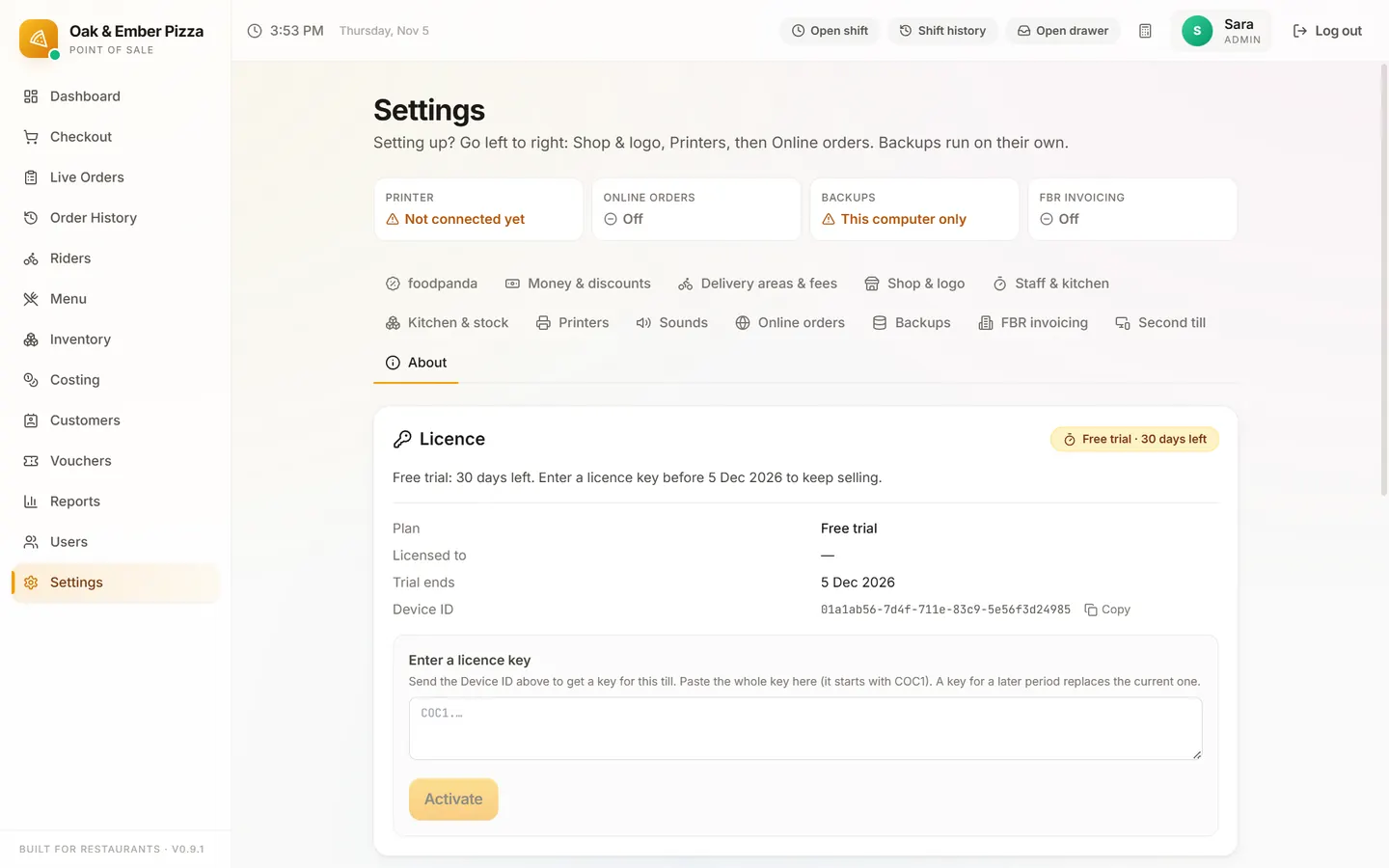
The key is checked on the till itself, so it works offline. It belongs to that PC: a new PC needs a new key.
What it costs
| Where | Starter / Pro / Business | One-time setup |
|---|---|---|
| Pakistan | Rs 2,499 / Rs 4,999 / Rs 9,999 a month | Rs 14,999 |
| Elsewhere | $25 / $45 / $199 a month | $49 / $99 / $199, waived on yearly plans |
The setup is paid after the 30-day trial, only if you keep the POS. Stop during the trial and you pay nothing; once paid, the setup is not refundable. Paying yearly is 10 months for 12. All plans and what they include.
Stuck on a step?
Message us on WhatsApp with a photo of the screen. We can also join a video call and fix it with you.